Search The Remachines Blog Archives

Friday, December 10, 2010

Helping Hands


This blog entry is for all of our customers who purchased computers from us this year and traded in their used equipment. We've been able to donate a total of 17 computers this year, all of them going directly to families who don't have one.

We hope to up this total next year, so if you know any companies or individuals who have windows XP or higher computers and don't know what to do with them, be sure to put them into contact with us, even if the computers don't "work". We can at least harvest parts from them and keep them in homes as long as possible!

Together we can and have made a difference!


Thanks again for your support this year,


Nate Sperloen, CEO and Audric Schieve COO, Remachines LLC

Tuesday, November 2, 2010

Why Everyone Sticks With What They've Got.

windows xp Install Windows xp Very Fast


We sell and fix a LOT of Windows XP machines. We still get a TON of requests for these machines, even for new computer builds. You might wonder WHY would ANYONE want to use an Operating System from 2001 in 2010. Well, the answer is...it just works.

[Check us out at Remachines.com ]

You're right in thinking that it may not work the best for special gestures, smoothness or other "enhancements". Windows 7 and Mac OSX have come a long way since XP, and they offer new features that really are great. But to be honest, most of our client base couldn't care less. You know why?

The software packages they paid for from 2001-Present are just that. Paid for. Written off business expenses, used every day, not even thought about anymore. Money for new technology can be used elsewhere, especially now when times are tough. Office 2003 works just fine. Adobe Acrobat 6 works fine. That special trading platform for stocks and FOREX work fine on Windows XP and DOES NOT work on 64 bit Windows 7 and doesn't work on Mac OSX. On a real weird note, I've had customers who even need Windows 98 for a court stenography program (who wants to cough up $3,000 for the Windows XP version?) and someone who needed Mac OS9 in order to run a loom for making wool rugs.

[Check us out at Remachines.com ]

Let's get it straight that we too love new gadgets. They're great, and the world needs to evolve. But at Remachines, we primarily deal with the dying edge not the cutting edge, and that's what makes us happy.

Helping our customers keep that green in their pocket as long as possible while being green by increasing the life expectancy of their electronics.


-Nate

[Check us out at Remachines.com ]

Friday, October 15, 2010

Made the Jump to Android - and Why It's Been Mostly Good


I've been rolling with my Samsung Intercept for about a month and a half, so I figured I'd write a review of what I thought of it, as well as the apps that I use.

There have been some reviews that Android is difficult to pick up, hard to work with, etc. I didn't find it difficult at all. As a lifetime Windows user, I think that all the tinkering and tweaking and fixing I've done over the years to make things exactly right helped me here. Sure, there are some sub-menus that might hold some secrets, and some settings that could be better explained, but really, if you've used a computer in the past 10 years, you shouldn't have any issues with Android.

[Check us out at Remachines.com ]

Installing apps is easy, you just go to the Market icon and find what you want. The app automatically downloads and installs itself. Of course, this works 90% of the time. I still have issues with app downloads hanging and never going anywhere. I sometimes have to cancel and restart them in order for them to complete.

Regarding my phone specifically, the Samsung Intercept from Sprint, it is fairly well laid out, it thicker than most sexy phones now, but that is partially because of the slider keyboard that is included. Let me tell you - having a slider keyboard is definitely a welcome option for folks who have larger hands and fingers. If you try to type on the phone's touchscreen, it's almost laughable. I have completed the word REMACHINES without messing up once though, so that's an accomplishment. Call me old school, but tactile keyboards are still where it's at for hammering out emails on the go.

Sometimes the phone's touch buttons (Home, Menu, Back, etc.) don't respond right away. I intentionally went with the slowest Android phone from Sprint because I wanted the best battery life, but really, this can be frustrating at times. I press home and I expect it to respond within two seconds...not 10 on occasion. But back to battery life, I can go two days with fairly heavy duty use without a charge. Not like I do, because I wouldn't want to be completely dead at the end of my second day, but it's nice to know that my phone is going to die just after lunch on day 1. I'm a battery holdout - I've been on enough international vacations to know that batteries are the key to life. Without them, you have no way to record your personal history. Life never happened. Same with the phone - if I miss a call, I miss a business opportunity. Batteries above all else.

[Check us out at Remachines.com ]

Finally, there's the apps I personally use. But rising like a superstar above all the other apps, making the iPhone users (sorry Audric) jealous and their phones substandard (in this matter).

The free included Google Navigation that meshes with Google Maps is easily the best app I have ever used, and it made my Garmin obsolete. It is supposedly in Beta right now, but really, it's found everything with turn by turn and with spoken street names. It rules, and makes having an Android a loaded weapon, saving you $5o - $100 on buying a GPS by itself. Honestly, I looked at my GPS and gave it away as an Xmas present in October.

Some other apps I use are K9 Email which works better than the included email program, Yahoo! Fantasy Football, Facebook (duh), Craigslist Notifier, Google Voice, Calendar, Google Finance, Dolphin Browser HD (has tabs like Firefox, until Firefox or Opera release something better), Dropbox (upload your pictures and video from your phone here and pull them down from your computer later) and The Weather Channel. These are the daily apps I use.

The special apps I use for program management are Advanced Task Killer (to kill running apps eating RAM and Battery during the day), and the best battery extending program Startup Cleaner Pro - which allows you to disable all the programs that start up on your phone when you turn it on. I mean, do I really need Craigslist Notifier running in the background? Sprint Nascar? Heck no. Goodbye, I will run you if I ever use you. This allowed me to disable about 10 apps that were sucking my cpu, ram and battery from behind the scenes, and in particular Amazon Mp3, the dreaded program that would always come back from the dead and start running again even if killed by Advanced Task Killer. Now it doesn't run in the startup, now it's disabled forever. Why don't I uninstall it? Because I can't. Some behind the scenes backroom deal with Google and Amazon put it on my phone forever (unless I root the phone). But now, it's a distant memory.

Overall I have to give my Android experience a very positive rating. I'm already thinking how good these phones are going to be in the next couple of years with Android 3.0 coming out, along with the advancements of cpu usage, speed and battery life. It's a very good tool with some quirks, but I'm glad I made the jump to a more open platform that has a ton of apps. Did I mention all the ones I use above were free? Nice.


-Nate


[Check us out at Remachines.com ]

Thursday, September 30, 2010

What are you really paying for? As Always, Cool.


Here at Remachines, we occasionally deal with the cutting edge of electronics, building custom gaming computers or repairing new items that have gone bust right away.

But in reality, we deal with the grave. The electronics that have either been deemed "uncool" or "obsolete" by society.

It's our responsibility to keep these electronics in the giant wheel of society until they truly completely break. And it's our responsibility to report that all that new stuff you're usually paying money for is usually a ripoff.

[Check us out at Remachines.com ]

The perfect example of this is the NEW Apple iPod Nano (pictured). It's barely bigger than a postage stamp, it has a fancy little touch screen so you can show off how cool your album art is or rotate this or that. It will likely be crushed or destroyed or put through the washer within six months.

And you just paid $150 for it. You know how much it cost to manufacture? An estimated $43.73. That is some killer profit margin. Yes, there are things such as advertising, jobs, and Steve Jobs to pay (his $1 salary) to also consider in the price, but in reality, why would anyone pay $150 for something less effective (remember, you have to look at the screen while using this, it is touchscreen and does not have physical buttons) than its predecessor?


Because as Americans, you can. You can buy the $150 device that you might get two years out of that is essentially another way to pry $.99 out of you for the new hot single that comes out every two weeks. But that's another blog entry, which is basically the idea that all of these new devices are essentially a "gateway drug" for your wallet opening up and robbing you through pennies instead of just grabbing the whole thing.

[Check us out at Remachines.com ]

The way I think of things is like this: $150 is about 10% the cost of an acceptable used car for a teenager, who probably lives in some suburban area that will need to commute to the larger city for some reason (possibly a technical college, work, etc.). If 10% of that budget is cut out towards the car an used on the newest technology that really isn't helping you succeed at all in this case, not only are you stuck with that technology (and the cool factor will fade FAST) but less money towards that car, meaning you will get less of a car and probably more problems because of it.

Life is all about trade offs, so do yourself a favor and grab an uncool alternative to expensive, relatively useless music players. You can probably find yourself something from Sandisk or Creative for a fraction of the price that will do 75% or more of the same things. And they probably won't lock you into a specific media store, slowly draining the power of your wallet.


-Nate

[Check us out at Remachines.com ]

Thursday, September 16, 2010

Skydrive v. Gmail Storage v. Dropbox

The world is now in the clouds. Sure, we can still store stuff locally, but the convenience of being able to store important data on some remote server somewhere on the planet without needing to set (most) of it up yourself is really quite nice.

There are three companies we've worked with in this mini review. We know there are more, but these are the three "easiest" free ones we know of and use ourselves.

Microsoft Skydrive, Google Gmail Storage, and Dropbox. Two big names, one small but fairly well known one (similar to Mozy).

[Check us out at Remachines.com ]

First on the block is Microsoft Skydrive. With Microsoft Skydrive you get 25GB of free online storage. That's a ton of storage for free! You also get access to Microsoft Office Live, which allows you to edit Word, Excel, Powerpoint and OneNote documents for FREE in your web browser. Yes, it actually works quite well.

The online navigation and upload process definitely has windows users in mind, as the directory structure starts you out in "My Documents", so the familiarity is there. We personally don't think this is necessary, but if you're used to using Windows, then this could help you out.

Uploading files is a little odd in that you can do the normal "browse" for file on your computer to upload, but you can also use a more sophisticated upload method if you have the Silverlight plugin. Right, like we said, it's primarily for Windows users if you want that, but you don't need it because...

You can map a network drive directly on your computer to your Skydrive account without any third party tools if you have Windows Vista or 7. This is easily the best part of Skydrive, as I now have a drive letter (S:) assigned to Skydrive. I just go to Computer and double click on it...it prompts me for my password and viola, all my documents are there so I can drag and drop them from Skydrive to my desktop and back. Now THAT is slick.


Rating: 4/5 Blue Screens (lost a point because no easy installer)

[Check us out at Remachines.com ]


Second up is Gmail storage. Gmail storage is a combined store of all your Picasa, Gmail and Google Docs. You get 8GB of storage capacity (from what we've read) for free and to upload documents is a little more hazy. Since we're trying to use Gmail as a storage point, we had to download a third party tool here: http://www.viksoe.dk/code/gmail.htm in order to get a "mapped drive" (it really isn't a mapped drive since you don't get a drive letter making more complicated uploads or backups impossible).

Setup was super easy with the third party tool, and we then went to Computer and there was Gmail Drive for our plundering. We double clicked, entered our username and password, and immediately dragged a simple file to the Gmail Drive.

Once uploaded we wondered where it would be stored. What's different from Skydrive is that the file actually creates an email in your Gmail inbox. This has its plusses and minuses, but for verification purposes we went into Gmail and deleted the "email". We then went back into Gmail Drive and the document was gone.

Pretty cool but kind of scary, especially if you accidentally delete your file along with your Spam.


Rating: 3/5 Androids (not for non-Gmail folks)

[Check us out at Remachines.com ]


Finally we have Dropbox, a company that offers up 2GB of storage for free, but really wants you to pay the $10 a month for 50GB or $20 a month for 100GB. Both are good deals, but you can get a USB external 120GB Hard Drive for $50 or so, so you do the math.

Installing the Dropbox app was simple, and it creates a nice folder called "My Dropbox" where you tell it to be located on your machine. By default it goes into My Documents, which is kind of buried in our opinion, so we changed the default location to Desktop, where we end up downloading and working with our documents anyway (hey, we're using Windows 7 here, we're used to a cluttered desktop!).

Dragging and dropping a file into dropbox is as simple as that, and the web interface is very similar to Microsoft's Skydrive (makes you wonder if Microsoft copied it).

However, the upload process is not instantaneous, and you need to run the Dropbox app in order for it to upload, which is kind of counter intuitive. Once run, the files sync and you can see them on the web. This seems to be taken care of automatically once it is run for the first time, but we believe it should be automatic for the end user.

Another nice thing is that you can make a mapped drive out of Dropbox, so you can access it from Computer, which gives this free product a boost.

Overall, this was the easiest product to setup and use from your PC. They obviously WANT you to use it in this manner, where Microsoft Skydrive and Gmail mapped drives are more like hacks instead of a normal installation.


Rating: 4/5 Dropped Boxes (lost a point because of least GB)

[Check us out at Remachines.com ]


-Nate

Thursday, September 9, 2010

Google Instant Search. You Can Turn It Off If You Want.

The mystery is gone forever I guess. Remember way back, two days ago when you would have to type in your Google Search and press Enter or the Search button?

Not Anymore.

If you haven't noticed, Google Instant Search is here, for better or worse.


[Check us out at Remachines.com ]

It's nice in some ways not to need to press the button, but is it necessary? And how well is it going to work on really old computers or Internet connections?

Thankfully, for folks that still have Dial Up or poor Satellite Internet connections, you can turn off Instant Search by clicking the little "Instant Search Is On" link next to the search button. This should definitely help your computer from completely freaking out.

Also, there were a couple of occasions yesterday when we ran some searches...and the White Screen of Death appeared in our Chrome browser. Let's hope that it's a temporary problem and not something that will continually plague our awful AT&T DSL connection, which regularly times out if you have three users concurrently doing something.

[Check us out at Remachines.com ]

Pretty soon I should be able to write this blog by just thinking about it...

...But what happens when I'm writing about computers and it thinks I'm writing about communism? I guess like everything else at Google, it'll be in "Beta" form for years.

Here's to progress.


-Nate

Monday, September 6, 2010

Keep your Computer Safe...r

We all know it's impossible to keep your computer 100% safe, even if it's offline.

What we can do, however, is try to keep your computer safe from what we see as the most nefarious hackers, crackers, breakers and destroyers of all.

Kids.

[Check us out at Remachines.com ]

Yes, kids are smart with that ol' technology, but what they're really good at is clicking and installing anything that gets in their way of playing a game or finding that new Justin Bieber hit.

They will click "FREE iPAD" ads and believe they are true. They will accidentally come to some...not safe for work websites and wonder how Antivirus 2010 was installed on their computer when they "didn't do anything" (to be fair, plenty of adults get this one too). They will install Limewire, Frostwire or other torrent programs to get their songs and videos to illegally fill up their iPods...and hopefully a letter from the MPAA and/or RIAA through your ISP doesn't come in the mail (we've known a few customers who have received cease and desist letters).

[Check us out at Remachines.com ]

So what can you do? Well, aside from making the guests of your computer(s) read the newspaper and play music on CDs, make them use the Guest Account or password protected account instead. It's really easy to setup, and if you put a password on their account, they will need to know that password in order to wreak their daily havoc. If they don't, you're a lot more protected without needing to go out and get Net Nanny or block certain websites in your home Wireless Router (if you still need this, give us a call).

As always, be sure you're running antivirus and antispyware. We recommend Microsoft Security Essentials and Malwarebyte's Anti-Malware. Both are free and do a great job of cleaning up bad stuff! If you're using a Mac, try out ClamAV.

Windows


Mac


[Check us out at Remachines.com ]

-Nate

Monday, August 30, 2010

Does everything need to be touchscreen?

Just like everyone else, I think that touchscreens are cool. It's nice to be able to move an icon around the screen, draw a line, do this do that.

But really - do we need touchscreens everywhere?


Take a look at that prototype iMac touch. Wow! How neat! You can...touch things!

Yes, very neat indeed. HP also has their breed of touchscreen devices and computers, and I'm sure this whole fad will be with us until non screen touching gestures are utilized over actually touching the screen...which is the problem.

[Check us out at Remachines.com ]

If you have a touchscreen device (Audric has an iPhone and Nate has the Samsung Intercept) you know how nasty that screen can get after a day of use. You seriously need to keep a microfiber towel handy to clean it off, otherwise in some sunlight, you're halfway trying to read text and smudge at the same time. It can look like Swamp Thing got ahold of your device.

I'm quite thankful that my Samsung Intercept has a real physical keyboard. With man hands it still is a bit small for my taste, but it does work and I don't have to type on the joke of a 3" screen (which I actually did once and somehow spelled "Remachines.com" correctly).

[Check us out at Remachines.com ]

I'm a holdout for things such as mice and screens until gestures (no, we're not talking a wand like the Nintendo Wii which is untolerable to control) become more mainstream. We're hoping that devices like the Microsoft Kinect for Xbox starts taking things to the next level. If it can, then all those front facing cameras will actually have a use other than trying to get some Facetime.

Then again, gestures might be a joke when your thoughts are downloaded immediately to the camera, like the most memorable part of Minority Report:


Still typing on my Logitech UltraX keyboard (I've had for five years).


-Nate


[Check us out at Remachines.com ]


Tuesday, August 24, 2010

Ridiculous Ink Costs - Time for Laser Printers!


I happened to be surfing Gizmodo this morning, and they had this funny link to how much ink cartridges cost in comparison to things like Bottled Water, Blood and Oil.

I really was set back on how much more the ink costs were in comparison to everything else.

I expected ink costs to be more, but not nearly double the cost of Human Blood!

[Check us out at Remachines.com ]

Now this article was created in 2006, and things have changed, but I don't expect them to have changed all that much. So what does this mean? We think it means that unless you really, really have a need for a color printer (like you need to make nice presentations, you print your own photos professionally, you basically are a business in need of one) you should have moved over to a nice laser printer a few years ago.

The cost of ownership is MUCH less, and you can sometimes even refill your own toner cartridges for 20% the cost of buying a new one (which if you did buy a new one, it still is about the same price as a single black ink cartridge).

We're currently selling some brand new Canon all in one (Print, Scan, Fax) Laser printers for $125. That's absurdly cheap. But what makes the deal even better is that you can get third party toner cartridges for around $30-$35. That's around another 2,000-4,000 pages of printing for what you normally would get 150-250 pages out of that inkjet for.

[Check us out at Remachines.com ]

We also sell new and used Laser and Inkjet printers for much less than that!

As always, your mileage may vary, but you can always keep your pocketbook from bleeding to death by moving to Laser and leaving services like Snapfish or Walgreen's to print your pictures.


-Nate

Monday, August 23, 2010

Samsung Intercept Android Smartphone Mini Review

I held out as long as I could from getting a real smartphone (sorry Windows Mobile 6.1, you don't count). The real reasons behind getting the Samsung Intercept from Sprint are:

1) The battery in my Samsung Ace was finally going out after two years of everyday use (and a couple of drops).

2) My wife's Samsung Upstage was totally flaking out, and without a removeable battery, you would have to do weird things like call it in order for it to respond.

3) I was able to get Sprint to get me both Samsung Intercept Android phones for $150 AR.

4) I was able to get Sprint to give me Nights and Weekends starting at 6PM instead of 7PM.

[Check us out at Remachines.com ]

My initial thoughts of the Samsung Intercept are positive. I'm a guy who runs a couple of apps and primarily uses it for Email. The slider keyboard really comes into its own element here, allowing me to blaze through emails instead of "pecking one out" on the touchscreen.

The battery life is superb for a smartphone. 2.5 days on a single charge with medium usage, it's basically what I need. I don't want to be tethered to the charger every few hours. That's just unacceptable (check out our battery post here: http://remachines.blogspot.com/2010/08/batteries-we-need-better-affordable.html )

The battery is good because it's an 800Mhz CPU instead of the 1Ghz ones in the Evo and Epic phones. But this is where the phone has its issues. Sometimes, when running two to three apps at a time, the phone's buttons (menu, home, back and search) just stop responding for up to 15 seconds. This is an obvious design flaw, and will hopefully be rectified with the eventual upgrade to Android 2.2.

[Check us out at Remachines.com ]

But overall I don't have any complaints other than that. The sound quality, even on speakerphone completely crushes my Samsung Ace. It is loud, rarely cuts out, and the speaker is clear for me to hear the person on the other line.

I'm going to give the device an early 8/10. I'll give it a few months and come back with what I think of it then (after I've dropped it a couple times).

[Check us out at Remachines.com ]

-Nate


Wednesday, August 18, 2010

Isn't my old mouse good enough?


When did the mouse I've had for the past...8 years become obsolete?

I still have my Logitech MX300 USB optical mouse that I bought a LONG time ago for $30 on my desk, and I've tried to switch to others.

I once got a birthday present in the form of the Logitech Laser mouse once, which had weights you could put in it and whatnot, but to be honest, it just had too many buttons. I found myself accidentally hitting things and messing up my chi.

[Check us out at Remachines.com ]

So I went back to the MX300, and never looked back...or would that be "forward"? It's the dull, black and silver "modern" look from about 2002. But how can it be beat? Certainly not by a laser mouse.

Take a look at that new Arc Touch mouse my Microsoft. Sure looks fancy. Maybe it will help some people with gaming or comfort. Probably costs $75, and is wireless (something to this day I am entirely against, except for the wireless keyboard and mouse combo that hooks up to my plasma).

But really, do we need better mice? Two buttons and a scroll seems to be working out just fine here. The Mx300 is 8 years old, and has cost me about $3.75 a year to use, and I don't see it stopping anytime soon. I can't see myself using a touchscreen for my desktop unless something (truly) magical comes around that doesn't leave smudges, and even if so, what's the point? So I can shift my photos around with my finger instead? OK, fine, progress wins.

Maybe I'm just old and am losing contact with the kids, which seems to be the case when I read those Beloit College Mindset Lists: http://www.beloit.edu/mindset/2014.php . I bet next year it'll say "Kids have never known anything that didn't have a touchscreen".

Which brings back a memory of when I used to work at EDS. One day we got a stockpile of Microsoft Intellimouse scroll mice in, and I thought I would be a savior for folks in an area that I know didn't have scroll mice. I was greeted as Computer Jesus by most, but of course, there always has to be one who doesn't play nice. She was a wonderfully crotchety woman, and was fine with having her rectangular Compaq mouse...forever. I was shocked, and tried to explain the benefits of the scroll mouse...to no avail. I went back to my desk defeated.

Here's to arched wrists and smudged screens forever.


-Nate

Monday, August 16, 2010

Madden 11 Mini Review (Thanks to EA and a Remachined Xbox 360)

Where to begin?

I'll be the first to admit that I'm not a console gamer. Of course I've played PS3, Xbox 360, Wii, whatever, but my weapon of choice has always been the
PC. I've always felt more in control of the game, be it using a mouse to snipe people versus a...controller or setting customized resolutions, playing in windowed mode, and basically throwing down a grand or so to build a box that plays...one game pretty well.

Well, here's to new things for me. My friend at EA sports mentioned the other day that Madden 11 was coming out. Normally I wouldn't care. I know Madden is THE football game to play, but I've got other things to do.

That was until a used Xbox 360
walked through my door on trade towards a used laptop. Along with 4 games and a wireless controller, I'd be a fool not to take it.

[Check us out at Remachines.com ]

But then again, in the electronics business, even a fool knows that Xbox 360s are easily one of the worst non-recalled electronic products ever produced. The failure rate on these things is horrendous. They usually bake themselves to de
ath and give you that nice red light of death.

Somehow this one, which smelled like an ashtray, ran great. I played some Tekken 6 to burn it in (like it needed it) and it went off without a hitch.

So that's where I drop a line to my friend at EA that I just got a 360. This was after cracking jokes that I hadn't played Madden since 1996 (which really is kind of true). She went ahead and overnighted me a complimentary copy of Madden 11, to which I owe them a mini review. So here we go.

Upon firing it up, the HD resolution going over HDMI on my 42" Panasonic Plasma looked amazing. I've never played a game that looked so good on a TV before. The good ol "EA Sports" logo slams in your face, and you're ready for some football.

T
hen Drew Brees shows up and ruins the moment with his contrived speech. A little "This is New Orleans" BS and whatnot. It really was kind of a downer and made me like him a little less for selling out like this.

[Check us out at Remachines.com ]

Thankfully that's in the extended intro, and that sappy stuff isn't dripping all over the game, since AC/DC Thunderstruck kicked in as soon as I got to the main menu.

Speaking of, where the heck is John Madden? His face is in the game sometimes, but you don't ever hear him talk. It's like he's dead or something, or locked up in solitary. It's kind of weird.

The new version of the game has GameFlow, which allows Madden to automatically pick a play based on where you are on the field and what down it is. That's pretty nice if I were 6 or if I was playing with someone who only knew football as soccer. I personally want control over my plays, but it does speed the game up for noobs and the play
calling is pretty logical.

Another weird thing about the game is that they took out speed burst. It's an automatic thing now, but how do you KNOW you're bursting and not just fat like Lendale White? It feels weird, but it does come into play when you bust through a hole or break to the outside...I just wish I could manually do it. You can enable it, but it should be on by default.

Gameplay is very smooth, and the game really requires you to wait for your receivers to hit their routes in order to complete passes. I'm a Tecmo Super Bowl guy (yeah, I'm that old) and I'm used to launching 70 yard passes and expect Henry Ellard to jump up and grab it over Deion Sanders' head. None of that is happening in Madden 11. If you try to float passes, you'll have every single one of them broken up or picked off. You need to have patience and really run a lot of crossing patterns and slant routes.

[Check us out at Remachines.com ]

Defense is actually fun to play. I've never felt as though I had the talent to be a defensive lineman and actually get a sack, or a cornerback and stick with my man without knocking him over and getting a penalty, so I play the nice easy role of middle linebacker. I have the ability to cover anywhere on the field or get in and stop the run.

You should ask the Steelers after I sacked Leftwhich about 8 times last night if he was going to play a few more quarters. I think the Lions are going to be a pretty good team this year (I picked a team randomly to start a season) as I smoked Pittsburgh 30-7. I yelled as I got a pick 6 and did a dive into the end zone all laid out posing for my football card. It was a great feeling.

I think Madden 11 is going to be a hit, and for someone who usually doesn't play console games, I was able to pick it up pretty fast (thanks for having a practice mode!). One final complaint is the constan
t reminder that the sponsor of the game is Verizon Wireless. OK, yes, I got it the first time Gus Johnson. You're more excited about that than my 30 unanswered points.

The minor issues with the game are definitely subdued by how amazing the game is. I'm glad I waited 14 years to play Madden again. However I do miss the 16 bit drunk sounding Madden and the hits and audio sounds like you were tackling a dog and not a person.

I have to give the game an A so far, but we'll see how generous I am if the Lions go 2-14!

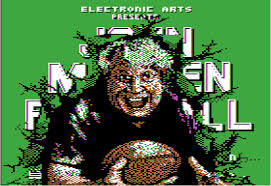
I guess it was a good idea to keep his face off the game (1988 Apple II version):


-Nate

[Check us out at Remachines.com ]